Web & Graphic Designer, Blogger, Musician, Evil Clown. I also code websites and promote people for a living. Still kind of a jerk, though. Approach with food.
“ 🦸 Become A VS Code SuperHero Today: https://vsCodeHero.com
🧑ðŸ¾ðŸ¤ðŸ§‘🽠Join my Discord developer community: https://discord.gg/A9CnsVzzkZ
I finally upgraded to Windows 11 and hate the added step to open a folder in VS Code from the file explorer.
In the new right-click context menu, you have to click “Show more options”, then “Open with Code”.
I’m sure there’s a way to modify the registry to add more options on the initial menu, but why reinvent the wheel. Someone has already built it.
I installed “Custom Context Menu” from the windows store. It says it’s $0.99 but you can install the trial and there are no limits. The $0.99 is there if you want to support the creator which is amazing.
Support creators whenever possible!
This project is open source as well. Feel free to check out the repo linked in the description.
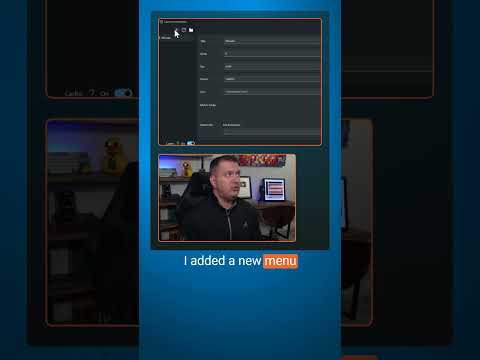
After installing it, I added a menu called VSCode, the exe command is code, param is path, I added match folder and file of * to match all. This tells the program when this menu should be shown. I want it to always be an option.
In the settings you can customize the name of the top level menu name.
Now, when I right-click, I see the menu option right away!
Custom Context Menu Repo: https://github.com/ikas-mc/ContextMenuForWindows11
_____________________________________
ðŸ› ï¸ Tools I use:
🟠codeSTACKr Theme: https://marketplace.visualstudio.com/items?itemName=codestackr.codestackr-theme
🟠STACKr Code Font (Exclusive to my VS Code Course – https://vsCodeHero.com)
🟠SuperHero Extension Pack: https://marketplace.visualstudio.com/items?itemName=codeSTACKr.superhero-extensions
_____________________________________
💖 Show support!
PayPal: https://paypal.me/codeSTACKr
_____________________________________
👀 Watch Next:
Playlist: Web Development For Beginners – https://www.youtube.com/watch?v=Ez4yHS2dsN8&list=PLkwxH9e_vrAJ0WbEsFA9W3I1W-g_BTsbt
_____________________________________
Web & Graphic Designer, Blogger, Musician, Evil Clown. I also code websites and promote people for a living. Still kind of a jerk, though. Approach with food.
“ Lean how to use FL Studio to produce music in this complete course for beginners. FL Studio is a complete software music production environment. It features a graphical user interface with a pattern-based music sequencer.
Tristan Willcox developed this course. You can email him at nebuloustdg@gmail.com
Web & Graphic Designer, Blogger, Musician, Evil Clown. I also code websites and promote people for a living. Still kind of a jerk, though. Approach with food.
Web & Graphic Designer, Blogger, Musician, Evil Clown. I also code websites and promote people for a living. Still kind of a jerk, though. Approach with food.
Web & Graphic Designer, Blogger, Musician, Evil Clown. I also code websites and promote people for a living. Still kind of a jerk, though. Approach with food.
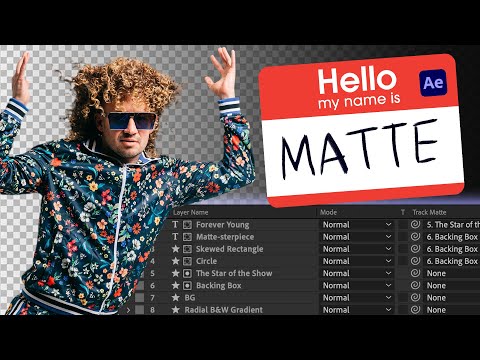
The 2023 update to After Effects made track mattes friendlier to use and much more versatile, so if ever there was a time to learn how to use track mattes in After Effects, that time is now. Track mattes are a super-powerful feature that may not be widely understood by a lot of After Effects users, but at least for you, that changes *today.*
Don’t know the difference between a mask and a matte? Never had to worry about an alpha channel or luminance values? That’s ok; we’ve got you. Join us on a matte-tastic journey through what a matte is, why you should use it, and all the creative ways you can take advantage of this cool tool in your own work.
Web & Graphic Designer, Blogger, Musician, Evil Clown. I also code websites and promote people for a living. Still kind of a jerk, though. Approach with food.
Web & Graphic Designer, Blogger, Musician, Evil Clown. I also code websites and promote people for a living. Still kind of a jerk, though. Approach with food.
“ Learn LaTeX in this full course for beginners. LaTeX is a typesetting system for creating professional-looking documents, commonly used in academia and scientific publishing, with a focus on content rather than appearance.
Web & Graphic Designer, Blogger, Musician, Evil Clown. I also code websites and promote people for a living. Still kind of a jerk, though. Approach with food.
💥 Don’t get over-charged with expensive pay-per-clip pricing. Embrace the freedom of an unlimited library with Storyblocks
â–º http://storyblocks.com/Cinecom
Web & Graphic Designer, Blogger, Musician, Evil Clown. I also code websites and promote people for a living. Still kind of a jerk, though. Approach with food.
Web & Graphic Designer, Blogger, Musician, Evil Clown. I also code websites and promote people for a living. Still kind of a jerk, though. Approach with food.
Disclaimer: The views expressed herein are solely those
of Eric Brooks. They do not necessarily
reflect those of his employers, friends, contacts, family, or even his pets (though my cat,
Puddy,
seems to agree with me on many key issues.). In accordance to my terms of use, you hereby
acknowledge my right to psychoanalyze you, practice accupuncture, and mock you incessantly
with every visit. As the user, you also acknowledge that the author has been legally declared
a "Problem Adult" by the Commonwealth of Pennsylvania, and is therefore not
responsible for any of his actions. ALSO, the political views and products advertised on this site may/may not reflect the views of Puddy or myself, so please don't take them as an endorsement. We just need to eat.